The whole Discord bot, typed end to end.
A TypeScript framework for Discord bots. A wrong route or option name is a compile error, before the bot ever connects. Every command, button, and event goes to a class you write, with reusable checks, any Vite plugin, hot reload, and a lot more built in.
- gateway & http transports
- typed slash commands
- typed slash options
- subcommand routing
- autocomplete handlers
- context menu commands
- typed command mentions
- typed emojis
- typed customIds
- ComponentsV2 first
- button, select menu & modal handlers
- confirmation prompts
- restart-proof pagination
- permission & role checks
- guild / DM / NSFW checks
- cooldowns
- sliding-window rate limiter
- reusable custom checks
- errors that reply and report
- error reports to a Discord webhook
- ordered startup & shutdown
- HTTP health check
- logger with named channels
- typed pub/sub bus
- interaction & event middleware
- typed event handlers & waitFor
- Vite HMR hot reload, gateway stays alive
- any Vite plugin
- .env modes
- full-screen dev terminal
- cloudflared dev tunnel
- project scaffolding
- seedcord codegen
- deploy commands from the CLI
- Node, Bun & single binary builds
- Cloudflare Workers
- your bot as an npm package
- typed plugins
- Postgres & Mongo plugins
- eslint rules for discord.js
The builder is the source of the types.
You define options on the standard discord.js builder for slash commands or context menu commands. seedcord codegen reads it and writes the accessor types, so the builder stays the only schema you maintain.
Choices become a literal union
'books' | 'films'
Required options are never null
use it directly
Getter signatures regenerate on change
import {
    RegisterCommand, BuilderComponent
} from '@seedcord/gateway';

@RegisterCommand('global')
export class SearchCommand extends
    BuilderComponent<'command'> {
    constructor() {
        super('command');

        this.instance
            .setName('search')
            .setDescription('Search the catalog')
            .addStringOption((o) => o
                .setName('category')
                .setDescription('What to look through')
                .setRequired(true)
                .addChoices(
                    { name: 'Books', value: 'books' },
                    { name: 'Films', value: 'films' }
                )
            );
    }
}import {
SlashRoute, SlashHandler
} from '@seedcord/gateway';
@SlashRoute('search')
export class SearchHandler extends SlashHandler<'search'> {
public async execute(): Promise<void> {
// generated accessor, no cast, no null check
const category = this.options.getString('category');
// ^? 'books' | 'films'
await this.reply(`Searching ${category}`);
}
}// Generated by `seedcord codegen`. Do not edit by hand.
declare module '@seedcord/gateway' {
interface SlashRegistry {
search: {
options: {
category: {
kind: 'string';
required: true;
choices: ['books', 'films'];
};
};
cache: 'cached';
};
}
}the resolved type
Hover category and the editor says 'books' | 'films'. You never typed that union.
const category = getString('category');
//    ^?  'books' | 'films'

const valid: 'books' | 'films' = category; // OK
const wrong: 'audio' = category; // Error 2322
Same command.
Far less to write.
// build it, route to the subcommand,
// validate, all by hand
const data = new SlashCommandBuilder()
    .setName('library')
    .addSubcommand((s) =>
        s.setName('search').addStringOption(...)
    );

client.on(Events.InteractionCreate, async (i) => {
    if (!i.isChatInputCommand()) return;
    if (i.commandName !== 'library') return;
    if (i.options.getSubcommand() !== 'search') return;

    const raw = i.options.getString('query');
    if (raw === null) throw new Error('required');
    // cast
    const query = raw as 'fiction' | 'nonfiction';

    // ...manual guard and cooldown checks...
    await i.reply(`Searching for ${query}`);
});

// plus a REST register script,
// plus a switch per subcommand,
// plus a full process restart on every editimport {
SlashRoute, SlashHandler,
Gated, GuildOnly
} from '@seedcord/gateway';
@Gated(GuildOnly())
@SlashRoute('library/search')
export class SearchHandler extends
SlashHandler<'library/search'> {
public async execute() {
const query = this.options.getString('query');
// ^? 'fiction' | 'nonfiction'
await this.reply(`Searching for ${query}`);
}
}
// the route, registration and guards are done.
// edit, save, hot reload, the connection stays up.By hand you wire the routing, registration and checks yourself. seedcord does all that from your decorators.
Your bot runs on Vite.
Bring any plugin.
seedcord loads your bot through Vite, from the first seedcord dev to the production build. With a plugin in seedcord.config.ts, your handlers import YAML, SQL, or anything else that plugin loads.
The same plugins, .env modes, and data files work in dev and in the build. ENV=staging pnpm build loads your .env.staging files, and envapt reads them in your bot.
import yaml from '@rollup/plugin-yaml';
import { defineConfig } from 'seedcord';

export default defineConfig({
    root: './src',
    instance: './bot.ts',
    build: { start: './index.ts' },
    vitePlugins: () => [yaml()]
});import {
SlashRoute, SlashHandler
} from '@seedcord/gateway';
import strings from '../strings.yaml';
@SlashRoute('greet')
export class GreetHandler extends SlashHandler<'greet'> {
public async execute(): Promise<void> {
await this.reply(strings.greeting);
}
}Two transports.
One way to write handlers.
Handlers, checks, and the rest of the seedcord API work the same way on both. The objects they read differ: raw payloads on http, discord.js objects on the gateway.
@seedcord/http
Answers Discord's interactions endpoint.
Discord POSTs each interaction to your URL, and seedcord verifies the Ed25519 signature before anything dispatches. A commands-only bot never opens a connection, so it runs wherever a request can reach it, like your own server or Cloudflare Workers.
@seedcord/gateway
Holds a websocket connection through the discord.js client.
Discord streams every event down it. Messages, joins, voice state, typing, and all other events. Each one gets a typed handler class, and handlers read discord.js objects. Pick it when your bot reacts to anything past interactions.
One build.
Five places to run it.
seedcord build turns the same bot code into whichever one you need.
a Node or Bun server
Point build.start at the file that starts your bot, then run the output.
node dist/index.mjs
one Bun binary
The build prints the command that compiles your bot into a single file.
bun build --compile
Cloudflare Workers
An http bot with a cloudflare.config.ts builds into a worker.
cf deploy --prebuilt
inside your server
With port: false, a Hono or Next.js route passes each request to the bot.
bot.fetch(request)
an npm package
Without build.start, the build exports your bot with its types. You can publish it to npm, and anyone can install it and start it.
pnpm add your-bot
import bot from 'your-bot';

await bot.start();
Discord hands back a flat string.
You get your typed fields.
A click arrives carrying the custom id you set, as one string. Split it yourself and every field comes back as string.
CustomId declares those fields once. this.params then returns each one at its real type.
Discord caps that string at 100 characters. The codec packs your fields into fewer of them than joining the values would.
import {
    BuilderComponent, CustomId
} from '@seedcord/gateway';

export const Roles = new CustomId('roles')
    .snowflake('memberId')
    .oneOf('mode', ['add', 'remove']);

export class RolePicker extends
    BuilderComponent<'menu_role'> {
    constructor(memberId: string) {
        super('menu_role');
        const id = Roles.encode({
            memberId,
            mode: 'add'
        });
        this.instance
            .setPlaceholder('Roles to add')
            .setCustomId(id);
    }
}import {
RoleMenuHandler, RoleMenuRoute
} from '@seedcord/gateway';
import { Roles } from '#components/role-picker';
@RoleMenuRoute(Roles)
export class RolePickerHandler extends
RoleMenuHandler<[typeof Roles]> {
public async execute(): Promise<void> {
const { memberId, mode } = this.params;
// memberId: string, mode: 'add' | 'remove'
const picked = this.event.values;
await this.reply(
`${mode} ${picked.length} <@${memberId}>`
);
}
}Compose the guards.
The compiler checks.
Stack @Gated guards on a handler and combine them with and() and or(). Guild, owner, role, permission and cooldown each run at runtime, before your handler does. Attach one to the wrong handler kind and it fails to compile.
A refusal answers the user on its own, with a message you write once beside the check. Everyday refusals stay out of your logs, and the ones you mark as faults get logged and reported.
import {
    Gated, and, or,
    GuildOnly, OwnerOnly, RequireRole,
    SlashRoute, SlashHandler
} from '@seedcord/gateway';

@Gated(or(
    OwnerOnly(),
    and(GuildOnly(), RequireRole(modRoleId))
))
@SlashRoute('ban')
export class BanHandler extends SlashHandler<'ban'> {
    public async execute() {
        // an owner, or a mod in a guild, gets through
    }
}
Write your own Plugin.
Reach it from every handler.
A plugin extends seedcord with whatever your bot needs, a database, a cache, a metrics client. Extend Plugin and give it a key when you attach it.
That key becomes a property on the same object every handler already carries. seedcord codegen writes its type, so this.core.uptime.startedAt compiles wherever you need it.
A plugin runs on both transports, and on Cloudflare Workers unless it needs a server. You can publish it to npm, and any other bot can attach it the same way.
import { Plugin } from '@seedcord/core/plugin';
import type { CoreBase } from '@seedcord/core';

export class Uptime extends Plugin {
    public startedAt = 0;

    constructor(
        host: CoreBase,
        private readonly label: string
    ) {
        super(host);
    }

    public async init(): Promise<void> {
        this.startedAt = Date.now();
        this.logger.info(`${this.label} up`);
    }
}import { Uptime } from '#plugins/uptime';
export default new Seedcord({
// ...your bot config
}).attach('uptime', Uptime, 'my-bot');// Generated by `seedcord codegen`. Do not edit by hand.
import type Bot from './bot';
declare module '@seedcord/gateway' {
interface Core {
uptime: (typeof Bot)['uptime'];
}
}The dev server has a UI.
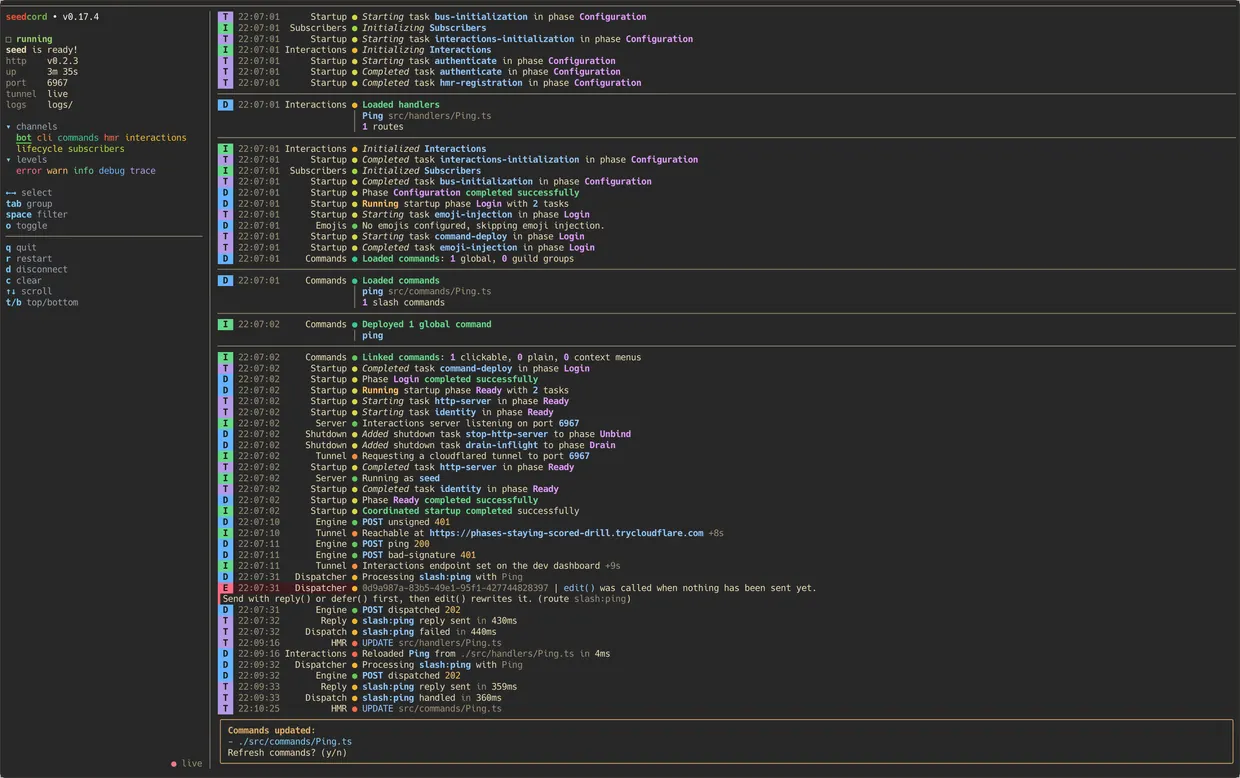
seedcord dev starts your bot inside a terminal UI. Filter the log stream by channel and level, and watch the uptime beside it. On http you get the bound port and the tunnel status too. Save a handler and Vite swaps it in a few milliseconds with the bot still up, so your change reaches Discord without a restart.
It all comes built in.
Commands · 06
decorator routing
@SlashRoute, @ButtonRoute and five more bind handlers at startup
subcommand routing
subcommands and groups, routed by name
typed slash options
accessors generated from your command definitions
typed autocomplete
a handler per option, and a missing one fails to compile
command mentions
renders </route:id> once Discord assigns the id
emojis
resolved at startup, reached by name
Components & replies · 06
component handlers
buttons, selects and modals, routed by customId
typed customIds
pack fields into 100 characters, decode them typed
context menus
user and message commands
multi-route handlers
one class serves several routes, narrowed by this.match
getConfirmation
an ephemeral confirm, resolves to a boolean
pagination
each nav button carries its page, so a restart keeps working
Events · 05
event handlers
body typed to the exact event
event emitter
event names and payloads typed together
typed waitFor
await a single typed event inline
pub/sub bus
framework events publish on default keys
middleware
runs before your handler, typed the same way
Guards & failures · 05
permission & role gates
checked before the handler runs
composable gates
stack them with and, or
cooldowns
scoped per user, guild or channel
rate limiter
a sliding window per key
errors
Notice refuses, Fault reports, Silence stays quiet
Runtime · 05
lifecycle
phased startup and shutdown
logger
named channels, levels and sinks
health check
an HTTP endpoint that reports readiness
webhook reporters
faults posted to a Discord webhook
typed env
envapt reads .env, your shell and Worker bindings
Tooling · 09
create seedcord
answers a few questions, writes the project
ready for agents
AGENTS.md, a skill and llms.txt
seedcord dev
a full-screen dev terminal
one dev session per app
a second seedcord dev on the same app stops and points at the first
hot reload
Vite HMR swaps changed modules, the gateway stays connected
dev tunnel
opens cloudflared and points Discord at it
codegen
writes the types for your commands and config
seedcord commands
deploy, list and clean up your commands on Discord
eslint rules
flags payloads Discord rejects, before you send them
Build · 08
Vite plugins
any Vite plugin, in dev and in the build
.env modes
ENV=staging loads your .env.staging files
data files
listed folders ship inside the build
Node or Bun
one bundle you start with node or bun
Bun binary
the build prints the compile command
Cloudflare Workers
an http bot builds into a worker
npm package
publish your bot for anyone to install and start
inside your server
a Hono or Next.js route calls bot.fetch()
Plugins · 03
typed plugins
attach once, codegen types it on core
Mongoose
MongoDB, services typed by key
Kysely
Postgres, queries typed off your schema
From zero
to hot reload.
Scaffold a typed bot, open it, and run it. seedcord sends each interaction to its handler, registers your commands, and types every option. Hot reload keeps the gateway connected while you edit.
# scaffold a typed bot
$ pnpm create seedcord my-bot
$ cd my-bot

# tui with hot reload, the gateway stays up
$ seedcord dev

# bot online, every slash option fully typed